


Hey marketer! 👋🏻
Be honest, when did you last search for something on Bing? Probably only by accident, when Windows opened Edge and sent you there. Most of us treat it as an annoying alternative that we switch to Google right after setting up a new computer.
When we think about SEO, we think about Google. Bing gets ignored completely. That’s a mistake, because Bing plays a very different role today. Its index is a source for AI tools. Microsoft’s Copilot pulls from it, and so does ChatGPT, to a large extent, when it searches the web for current information.
I see it every day, both with my clients and on my own websites. Traffic from ChatGPT and other AI tools keeps growing, and people coming from them often buy or send inquiries. But before AI can recommend you, it needs to know your website exists. And that’s where Bing comes in.

Why Bother with Bing at All
If your page isn’t in Bing’s index, the chances that Copilot or ChatGPT will find and cite it drop significantly. Lots of websites that do perfectly fine on Google are missing from Bing, or only have some of their pages there. Their owners simply never added them to Bing’s webmaster tools.
Let’s be realistic, though. Getting indexed in Bing won’t guarantee that ChatGPT starts recommending you. ChatGPT now draws on multiple sources and picks content based on how well it answers the question. Bing is a basic requirement here, and without it things will be harder. It won’t replace quality content and a clear, easy-to-use website.
The good news? Setting it up takes a few minutes and costs nothing.
Adding Your Website via Google Search Console
Open Bing Webmaster Tools and sign in. Your Google account works just fine, no need to create a Microsoft account.
If your website is already verified in Google Search Console, you’re all set. Bing lets you import websites directly from Search Console. Sign in with the same Google account you use for Search Console, grant access, and pick the websites you want to add from the list. Bing verifies them right away and also takes over the sitemaps you’ve uploaded there. No codes or files to upload to your website.
If you don’t use Search Console, you can add your website manually. Bing offers verification via a file, a meta tag, or a DNS record, similar to Google.
The first data in your reports should show up within about 48 hours.
Your Sitemap Is a Map of Your Website
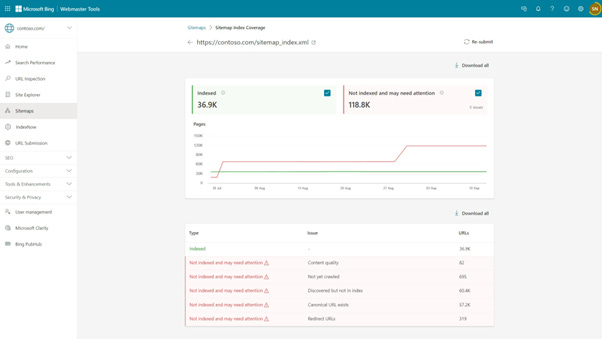
A sitemap is a file listing all the pages on your website, which tells search engines what to crawl. On WordPress, it’s usually created by your SEO plugin. On Shopify, you get one automatically at yourstore.com/sitemap.xml.
If you imported your website from Search Console, your sitemap was most likely transferred automatically. Just to be sure, check the Sitemaps section, and if it’s missing, add it manually.
Submitting a Page for Indexing Manually
This is the feature you’ll appreciate the most. When you publish a new article or product, you don’t have to wait for Bing to discover it on its own. In the URL Submission section, paste the page address and submit it for processing. You can submit up to 10,000 URLs a day this way, so a typical website will never hit the limit.
This sends Bing a signal that there’s something new. But Bing still decides on its own whether to add the page to its index. Submitting shortens the wait, it doesn’t guarantee indexing.
IndexNow: Automatic Change Notifications
Manual submission is great for individual pages. IndexNow is more convenient. It’s a simple protocol that lets your website notify search engines automatically every time you add or change content. Besides Bing, it’s supported by other search engines such as Yandex, Naver, and Seznam, so one submission reaches several of them at once. Google doesn’t support it.
On WordPress, just install Microsoft’s official IndexNow plugin, or turn the feature on in your SEO plugin if it offers it (Rank Math does, for example). After that, you don’t have to worry about a thing.
See Where AI Cites You
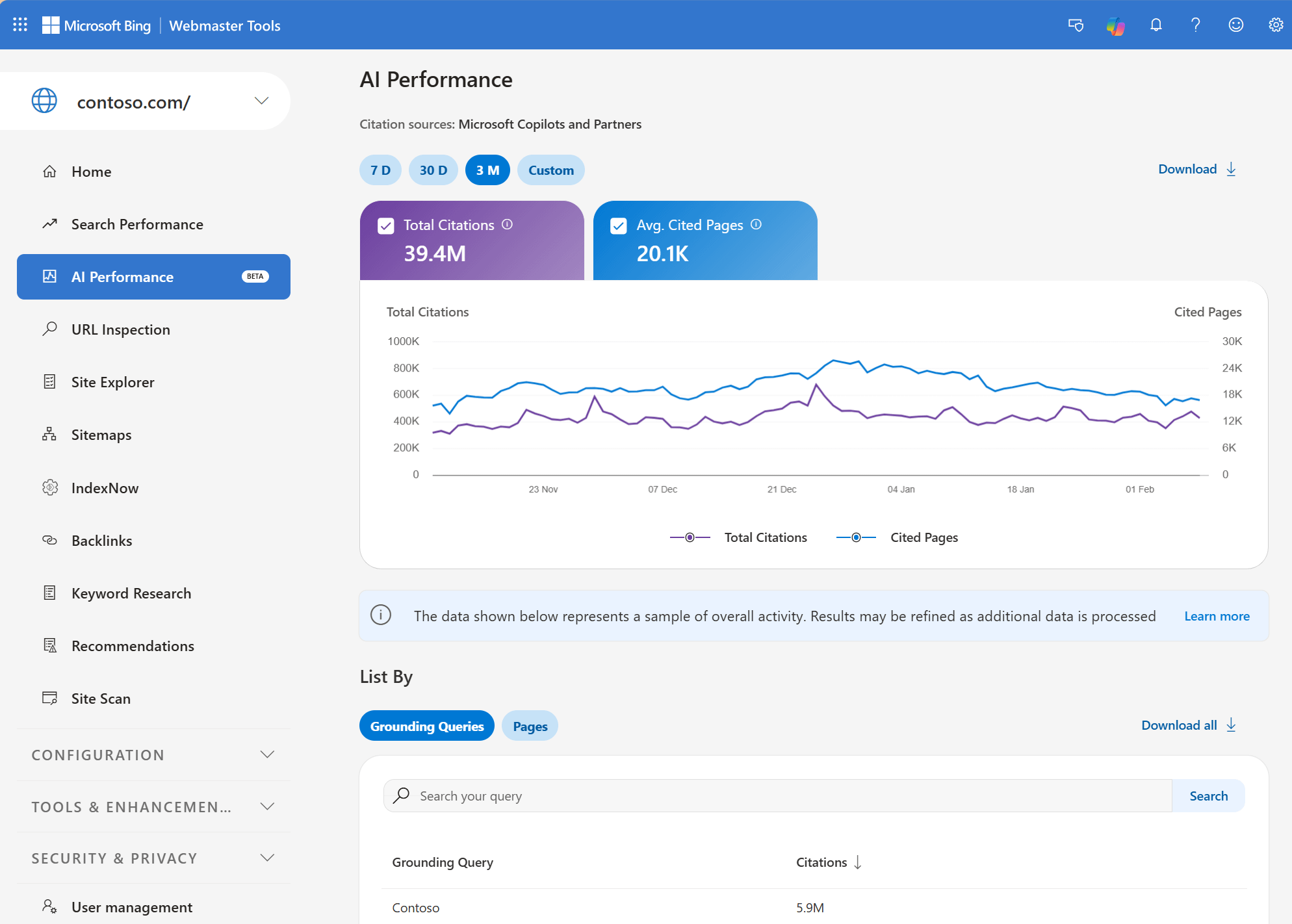
In February this year, Microsoft added an AI Performance report to Bing Webmaster Tools. It shows how many times Copilot and AI summaries in Bing used your website as a source, which specific pages they used, and for which topics. For now, the data only covers Microsoft services, so you won’t see ChatGPT there. Still, it’s the first tool that shows you whether and how AI works with your content.
Ten Minutes Well Spent
Try to set aside ten minutes this week. Add your website to Bing Webmaster Tools by importing it from Search Console, check your sitemap, and submit a few of your most important pages for indexing. If you’re on WordPress, turn on IndexNow while you’re at it.
Don’t expect miracles overnight. It’s a one-time setup that opens the door to the tools people increasingly use to find what to buy and who to turn to. And in a few weeks, take a look at the AI Performance report. You might be surprised where your website shows up.
See you in the next article,
Jan Barborik
P.S.: If you enjoyed this article, forward it to a friend.
If you're that sexy friend, subscribe here.
P.P.S: Enjoying the content? Support the project! Help me keep creating practical marketing content by buying me a coffee. Every cup fuels more articles, tips, and resources for fellow entrepreneurs like you!