


Hey marketer! 👋🏻
After two months of silence, I’m back in your inbox. The pause wasn’t planned. My wife and I had to unexpectedly move our company to new premises. Along with finding the space came its renovation and relocating production while running at full capacity. Add client work on top of that, and there was simply no time left for honest content creation. It bothered me, but I had to put writing aside for a while. Now everything’s moved, the kids are at summer camp, we’re up and running again, and here I am, back to the newsletter in the middle of summer. 😁
And it all actually ties in nicely with today’s topic. This intense period reminded me once again how precious and limited time is - and how important it is to spend it on things that truly matter, without getting distracted.
🔍 Regular reviews are non-negotiable
I consider it essential to do ongoing reviews of my workflows and my whole strategy (both marketing and business). It’s nothing complicated. Just sit down once in a while and honestly assess whether the situation you’re in, and how it’s developing, still matches what you planned. Whether something has changed, whether there’s a new development or a market shift. Time keeps moving forward, and the only certainty is change. In today’s turbulent times, you need to stay agile and adapt to the market and conditions. That’s why strategy needs to be regularly evaluated and adjusted.
Part of my reviews is hunting for bottlenecks - the places that limit me in my work. These are partly activities that slow me down and that I don’t enjoy (like timesheets or admin), and partly activities that eat up way too much time (and could be sped up through automation, delegation, or AI). Simply put, the things standing between you and progress. I try to eliminate these bottlenecks one by one, and lately, artificial intelligence has been helping me a lot with that.
I don’t want Marketing on My Own to turn into a newsletter about AI. But I have to say that one of the most useful things the rise of artificial intelligence has brought are MCP servers and CLI clients.
🔌 MCP servers connect AI to the tools you use
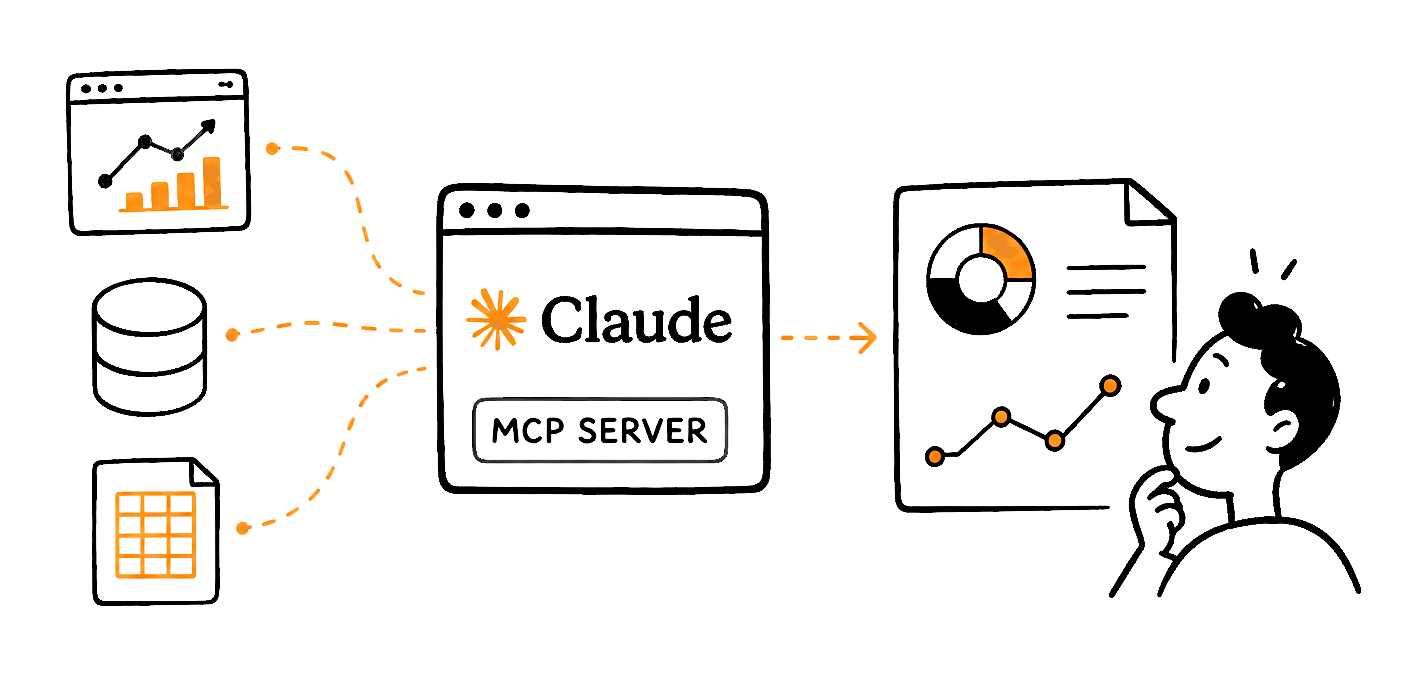
It sounds complicated, but the principle is simple. An MCP server is a bridge that lets artificial intelligence safely look into your apps and work with the data in them. A CLI client is a tool through which you control AI directly on your computer, and it works with your files and programs for you.
💡 What is an MCP server?
A bridge between artificial intelligence and the apps you use. Thanks to it, AI can safely access data in your invoicing system, calendar, or spreadsheets - and work with it right away. You just tell it what you need, and it pulls the data itself. Without an MCP server, you’d have to click through every app, copy the data out, and hand it to the AI manually.
💡 What is a CLI client?
A tool that lets you control artificial intelligence directly on your computer - you give it instructions in text, and it works with your files and programs for you. CLI stands for command line interface. It sounds like something for programmers, but you control it in plain language. You type something like “go through all the invoices in this folder and make me a summary,” and it does it.
I use Claude by Anthropic as my main work tool - I’ve mentioned that here many times. And I have a whole range of tools connected to it: my SEO tool, my invoicing system, my project management app, and my time tracker. Thanks to that, I can prepare analyses, overviews, and reports on practically anything in a flash. For example, I pull up the performance of an email campaign, add website traffic stats, and compare what changes were made to the site during that period. In a few minutes, I have a detailed marketing report that would have taken me hours to prepare before.
The great thing is that I can also set up automations. Based on my instructions, Claude processes the necessary sources on its own and sends the output to Slack, our company chat. So every morning, I get my overviews delivered, and I know exactly what’s going on and what’s ahead of me.
🧠 Context and Skills will save you a ton of explaining
There’s one more thing I’d like to add - the importance of building context. For every project, I have a set of text files with a detailed description of what the project is, how I approach it, and what matters for it. In recent months, I’ve been benefiting from this enormously. The better the context, the better the outputs.
And if you do certain things repeatedly, you can create a so-called Skill in Claude. Essentially, it’s a packaged workflow. You upload your materials and instructions once, and then you just call it in a specific chat instead of explaining and attaching everything over and over. The setup takes a moment, but in the long run, it speeds you up significantly. And most importantly, you get consistent output every time.
💡 A Skill is a packaged workflow for AI. You write down once how Claude should handle a repeated task, and then you just call it without explaining anything again. Skills are written in Markdown - a simple text format where formatting is marked directly in the text. Both humans and machines can read it, which is why AI tools work with it so well.
From a marketer’s perspective, this is a fundamental skill - having your know-how, your approach, and your information written down as well as possible, continuously expanding it, and working with it. It’s a natural continuation of the second brain I’ve written about here before. Critically build a library of the most important things you know, and avoid mindlessly copying clever-sounding advice from the internet.
⚠️ Beware of fun disguised as work
I do have one reservation, though. I’ve noticed that a lot of people use AI mainly because it’s fun. And they justify this fun by telling themselves they’re doing something for their business. They code websites and apps they don’t need, build agents they’ll never properly use. Essentially, they’re procrastinating. It used to be similar with Notion. It’s so flexible that you can build anything in it - and that’s exactly why so many people spent dozens or even hundreds of hours building the perfect system. Instead of finally using it to save them work or make them money.
AI is also just a tool, and no tool replaces a good strategy. And as much as we might wish otherwise, it doesn’t work instead of us. It’s still just a tool that needs to be used smartly. That’s why I recommend starting with the bottlenecks, then asking whether AI can solve them, and only then playing around with the solution.
🚀 Try it yourself
And that brings me to a challenge for you. Do your own little review. Sit down and write out what slows you down at work or in your business, what limits you, where your biggest bottleneck is. Then, for each item, think about whether artificial intelligence could help you with it. Sometimes it’s enough to delegate the activity or stop doing it altogether. But it’s at least worth considering.
And if you’re tempted to experiment with MCP servers and Skills but still feel lost, start with the official documentation and free guides from Anthropic - they explain the basics in an accessible way, and you can build up from there step by step.
See you in the next one 👋🏻
Jan Barborik
P.S.: If you enjoyed this article, forward it to a friend.
If you're that sexy friend, subscribe here.
P.P.S: Enjoying the content? Support the project! Help me keep creating practical marketing content by buying me a coffee. Every cup fuels more articles, tips, and resources for fellow entrepreneurs like you!